How to Sync 1M Products in Under 30 Seconds
Syncing a million products sounds impossible in under 30 seconds. Here’s the five-layer architecture that makes large-scale product sync work: delta detection, chunked streaming, parallel batch upserts, backpressure, and reconciliation.
Written by Artemii Karkusha — Integration Architect
A client asked me: "Can we run a product sync of our entire catalog — over a million SKUs — from SAP to Shopware in real time?"
I said no. Real-time product sync at that scale is the wrong goal. But a delta-based product sync completing in under 30 seconds? That's achievable — and this article breaks down exactly how.
Most integration teams hit a wall around 10,000 products. The sync slows to a crawl, the ERP starts throttling requests, memory spikes, and someone suggests "just run it overnight." That's not a solution — it's surrender. A product sync that can't keep up with catalog changes is a product sync that guarantees stale prices, phantom inventory, and lost revenue.
This article walks through the five-layer architecture I use to sync catalogs with 1M+ SKUs — with code examples, real production numbers, and the mistakes I've seen senior teams make.
Why Naive Product Sync Breaks at Scale
Before we solve this, let's understand why the obvious approach to product sync fails. Here's what most teams build first:
// The naive approach — works for 1,000 products, dies at 100,000
const syncAllProducts = async (): Promise<void> => {
  const products = await erp.getAllProducts(); // 1M products in memory
  for (const product of products) {
    await ecommerce.upsertProduct(product); // One. At. A. Time.
  }
};
This approach has four fatal problems:
Memory explosion. Loading 1M products into memory at once can consume 4-8 GB of RAM depending on payload size. Your container gets OOM-killed, and the sync dies silently.
Serial execution. Processing products one by one means each sync takes 1M × avg_latency. At 50ms per upsert, that's 13.8 hours for a single product sync cycle.
No fault tolerance. If the process crashes at product 500,000, you start over. There's no cursor, no checkpoint, no way to resume.
API rate limits. Both the source ERP and target eCommerce platform have rate limits. Serial requests waste your rate budget on wait time instead of useful throughput.
This is The Latency Compounding Law in action — individually fast API calls compound into an impossibly slow product sync pipeline.
The Five-Layer Product Sync Architecture
The solution has five layers, each solving one specific bottleneck in the product sync pipeline:
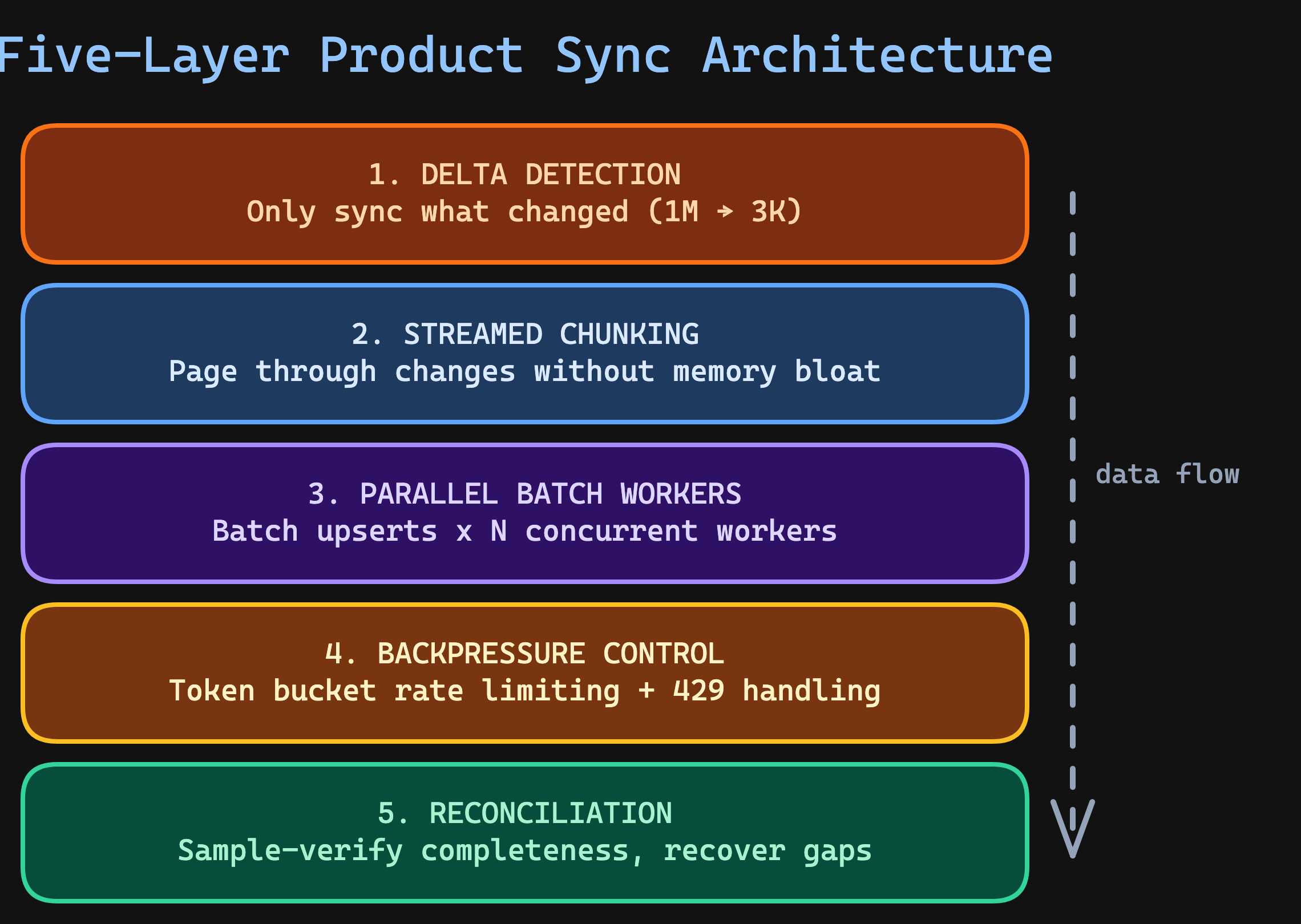
Let's build each layer.
Layer 1: Delta Detection — The 99% Optimization
The single most impactful optimization for any product sync: don't sync everything. Sync only what changed since the last run.
In a catalog of 1M products, a typical hour sees 500-5,000 changes — prices, stock levels, descriptions, new SKUs. That's 0.05-0.5% of the catalog. Running a full product sync every time is like reprinting an entire newspaper because one headline changed.
interface DeltaCursor {
  readonly lastModifiedAt: string;
  readonly lastProcessedId: string;
}

const streamDelta = async function* (
  cursor: DeltaCursor,
  pageSize: number = 500
): AsyncGenerator<ReadonlyArray<Product>> {
  let currentCursor = cursor;
  let hasMore = true;

  while (hasMore) {
    const page = await erp.getProductsModifiedSince({
      since: currentCursor.lastModifiedAt,
      afterId: currentCursor.lastProcessedId,
      limit: pageSize,
      orderBy: "modified_at",
    });

    if (page.length === 0) {
      hasMore = false;
      break;
    }

    yield page;

    const lastProduct = page[page.length - 1];
    currentCursor = {
      lastModifiedAt: lastProduct.modifiedAt,
      lastProcessedId: lastProduct.id,
    };

    hasMore = page.length === pageSize;
  }
};
Notice this uses an async generator — it pages through changes from the source system without loading everything into memory. Each page is yielded, processed, and released. For a 50,000-product delta, peak memory stays at pageSize × productSize instead of 50,000 × productSize.
Which delta strategy fits your source system
Timestamp-based — the source provides a modified_at field. Query with WHERE modified_at > :lastSync. Fast, simple, works with most REST and OData APIs. But beware: some ERPs update timestamps inconsistently. SAP doesn't always update AEDAT for price-only changes.
Checksum-based — compute a hash of each product's data fields and compare against stored checksums. More reliable than timestamps, but requires fetching data first. Use this as a secondary verification layer.
Change Data Capture (CDC) — the source emits change events via a stream (Kafka, database triggers, SQL Server Change Tracking). The most efficient approach, but requires infrastructure support. If your source supports CDC, it eliminates the delta detection layer entirely — changes arrive as they happen.
Layer 2: Streamed Chunking — Constant Memory, Any Scale
Even after delta detection, a bulk price update can produce 50,000 changed products. The chunking layer groups them into fixed-size batches for parallel processing — but critically, it works as a stream, not a collect-then-split.
const chunkStream = async function* <T>(
  source: AsyncGenerator<ReadonlyArray<T>>,
  chunkSize: number
): AsyncGenerator<ReadonlyArray<T>> {
  let buffer: T[] = [];

  for await (const page of source) {
    buffer.push(...page);

    while (buffer.length >= chunkSize) {
      yield buffer.slice(0, chunkSize);
      buffer = buffer.slice(chunkSize);
    }
  }

  if (buffer.length > 0) {
    yield buffer;
  }
};
Chunk sizing matters. Too small and HTTP overhead dominates. Too large and you risk memory pressure, long retry windows on failure, and wasted work if a chunk partially fails.
| Product Payload Size | Recommended Chunk | Why |
|---|---|---|
| Small (< 1 KB per product) | 500-1,000 | Network round-trip overhead dominates |
| Medium (1-10 KB) | 100-500 | Balanced throughput and memory |
| Large (10-100 KB) | 20-100 | Memory and request timeout constraints |
| With images/binaries | 5-20 | Upload bandwidth is the bottleneck |
Layer 3: Parallel Batch Workers — The Speed Multiplier
This is where the performance leap happens. Two optimizations compound here:
- Batch upserts — send 100 products per API call instead of 1
- Parallel workers — run N workers consuming chunks simultaneously
interface BatchUpsertResult {
  readonly succeeded: number;
  readonly failed: ReadonlyArray<{
    readonly sku: string;
    readonly error: string;
  }>;
  readonly durationMs: number;
}

const batchUpsert = async (
  products: ReadonlyArray<Product>
): Promise<BatchUpsertResult> => {
  const start = Date.now();
  try {
    // Most eCommerce platforms support bulk endpoints:
    // Shopware: POST /api/_action/sync
    // Magento: POST /rest/V1/products (array body)
    // Adobe Commerce: POST /rest/V1/products (async bulk)
    const response = await targetApi.bulkUpsert(products);

    return {
      succeeded: response.created + response.updated,
      failed: response.errors.map((e) => ({
        sku: e.sku,
        error: e.message,
      })),
      durationMs: Date.now() - start,
    };
  } catch (err) {
    // Entire batch failed — return all as failed for retry
    return {
      succeeded: 0,
      failed: products.map((p) => ({
        sku: p.sku,
        error: err instanceof Error ? err.message : String(err),
      })),
      durationMs: Date.now() - start,
    };
  }
};
The worker pool pulls chunks from a shared queue. Each worker sends batch upserts with rate limiting:
interface WorkerPoolConfig {
  readonly concurrency: number;
  readonly onChunkComplete: (result: BatchUpsertResult) => void;
}

const processWithWorkerPool = async (
  chunks: AsyncGenerator<ReadonlyArray<Product>>,
  rateLimiter: TokenBucketLimiter,
  config: WorkerPoolConfig
): Promise<ReadonlyArray<BatchUpsertResult>> => {
  const results: BatchUpsertResult[] = [];
  const queue: Array<ReadonlyArray<Product>> = [];
  let streamDone = false;

  // Fill queue from stream
  const fillQueue = async (): Promise<void> => {
    for await (const chunk of chunks) {
      queue.push(chunk);
    }
    streamDone = true;
  };

  // Worker: pull from queue, upsert with rate limiting
  const worker = async (): Promise<void> => {
    while (true) {
      if (queue.length === 0 && streamDone) break;
      if (queue.length === 0) {
        await delay(50);
        continue;
      }

      const chunk = queue.shift()!;
      await rateLimiter.acquire();

      const result = await batchUpsert(chunk);
      results.push(result);
      config.onChunkComplete(result);
    }
  };

  // Run queue filler + N workers in parallel
  await Promise.all([
    fillQueue(),
    ...Array.from({ length: config.concurrency }, () => worker()),
  ]);

  return results;
};
How to choose concurrency
The right number of parallel workers depends on which system is the bottleneck:
- Target API rate limit — if Shopware 6 allows 100 requests/second, 20 workers at 5 req/s each saturates the limit cleanly
- Source ERP capacity — SAP BAPIs often handle only 5-10 concurrent connections before degrading everyone's performance. This is The ERP Bottleneck Principle — the ERP is a system of record, not a system of interaction
- Network bandwidth — large payloads with product images can saturate egress
- Worker memory — each worker holds one chunk: 20 workers × 200 products × 10 KB = 40 MB (manageable)
Start with 5 workers. Measure throughput. Increase in steps of 5 until throughput plateaus or error rates increase. In my experience, 10-20 workers is the sweet spot for most ERP-to-eCommerce product sync pipelines.
The Math Behind "Under 30 Seconds"
Sequential individual upserts: 50,000 products × 50ms = 2,500 seconds (41 minutes).
Sequential batch upserts (200/batch): 250 requests × 300ms = 75 seconds.
Parallel batch upserts (20 workers): 250 requests ÷ 20 = ~13 requests/worker × 300ms = 3.9 seconds.
Delta detection (1M → 3K) + parallel batch upserts (3K in ~4s) = product sync under 30 seconds, every cycle.
Layer 4: Backpressure Control — Don't Kill the Target
Parallel workers without rate control will overwhelm the target system. I've seen teams take down their own Shopware instance by firing 500 concurrent requests during a catalog product sync.
Backpressure means your pipeline adjusts its speed based on the target's capacity. The token bucket pattern is the industry standard:
interface TokenBucketConfig {
  readonly maxTokens: number;          // Burst capacity
  readonly refillRate: number;         // Tokens added per second
  readonly refillIntervalMs: number;   // How often to refill (usually 100ms)
}

const createTokenBucket = (config: TokenBucketConfig) => {
  let tokens = config.maxTokens;

  // Refill tokens periodically
  const refillInterval = setInterval(() => {
    const tokensToAdd = config.refillRate * (config.refillIntervalMs / 1000);
    tokens = Math.min(config.maxTokens, tokens + tokensToAdd);
  }, config.refillIntervalMs);

  const acquire = async (): Promise<void> => {
    while (tokens < 1) {
      await delay(config.refillIntervalMs);
    }
    tokens -= 1;
  };

  const destroy = (): void => {
    clearInterval(refillInterval);
  };

  return { acquire, destroy };
};

// Usage: 100 requests/second with burst of 20
const limiter = createTokenBucket({
  maxTokens: 20,
  refillRate: 100,
  refillIntervalMs: 100,
});
Handling 429 responses gracefully
When the target responds with 429 Too Many Requests, your pipeline must slow down — not retry blindly. This is where The Retry Storm Effect bites hardest. A naive retry loop on rate-limited responses turns into a self-inflicted DDoS.
const batchUpsertWithBackoff = async (
  products: ReadonlyArray<Product>,
  rateLimiter: TokenBucketLimiter,
  maxRetries: number = 3
): Promise<BatchUpsertResult> => {
  for (let attempt = 0; attempt <= maxRetries; attempt++) {
    await rateLimiter.acquire();

    try {
      return await batchUpsert(products);
    } catch (err) {
      if (isRateLimited(err) && attempt < maxRetries) {
        // Respect Retry-After header, or use exponential backoff
        const retryAfter = extractRetryAfter(err) ?? 1000 * 2 ** attempt;
        await delay(retryAfter);
        continue;
      }
      throw err;
    }
  }

  throw new Error("Exhausted retries");
};
Key detail: the backoff uses 2 ** attempt (1s, 2s, 4s) — exponential, not linear. This gives the target system time to recover instead of hammering it at a fixed interval.
Layer 5: Reconciliation — Trust but Verify
After the parallel product sync completes, verify that every product made it to the target. Network failures, partial timeouts, and silent drops can leave gaps — and a product sync that "seems to work" is the most dangerous kind.
interface ReconciliationReport {
  readonly totalExpected: number;
  readonly sampleSize: number;
  readonly missing: ReadonlyArray<string>;
  readonly stale: ReadonlyArray<{
    readonly sku: string;
    readonly sourceChecksum: string;
    readonly targetChecksum: string;
  }>;
  readonly estimatedMissRate: number;
}

const reconcile = async (
  syncedSkus: ReadonlyArray<string>,
  sourceChecksums: ReadonlyMap<string, string>
): Promise<ReconciliationReport> => {
  // Sample-based verification: 1,000 random products
  // gives 95% confidence at ±3% error margin
  const sampleSize = Math.min(syncedSkus.length, 1000);
  const sample = pickRandomSample(syncedSkus, sampleSize);

  const missing: string[] = [];
  const stale: Array<{
    sku: string;
    sourceChecksum: string;
    targetChecksum: string;
  }> = [];

  // Batch-fetch from target to avoid N+1
  const targetProducts = await targetApi.getProductsBySkus(sample);
  const targetMap = new Map(targetProducts.map((p) => [p.sku, p]));

  for (const sku of sample) {
    const targetProduct = targetMap.get(sku);

    if (!targetProduct) {
      missing.push(sku);
      continue;
    }

    const sourceChecksum = sourceChecksums.get(sku) ?? "";
    const targetChecksum = computeChecksum(targetProduct);

    if (sourceChecksum !== targetChecksum) {
      stale.push({ sku, sourceChecksum, targetChecksum });
    }
  }

  return {
    totalExpected: syncedSkus.length,
    sampleSize,
    missing,
    stale,
    estimatedMissRate: missing.length / sampleSize,
  };
};
Note that the reconciliation step batch-fetches from the target (getProductsBySkus) instead of querying products one by one. This avoids the same N+1 problem we solved in the sync itself.
Production Architecture: Queue-Based vs In-Process
The code above shows an in-process worker pool — workers and the queue live in the same process. This works for small-to-medium product sync volumes (under 100K changes/cycle). For larger scales or multi-service architectures, use a message queue:
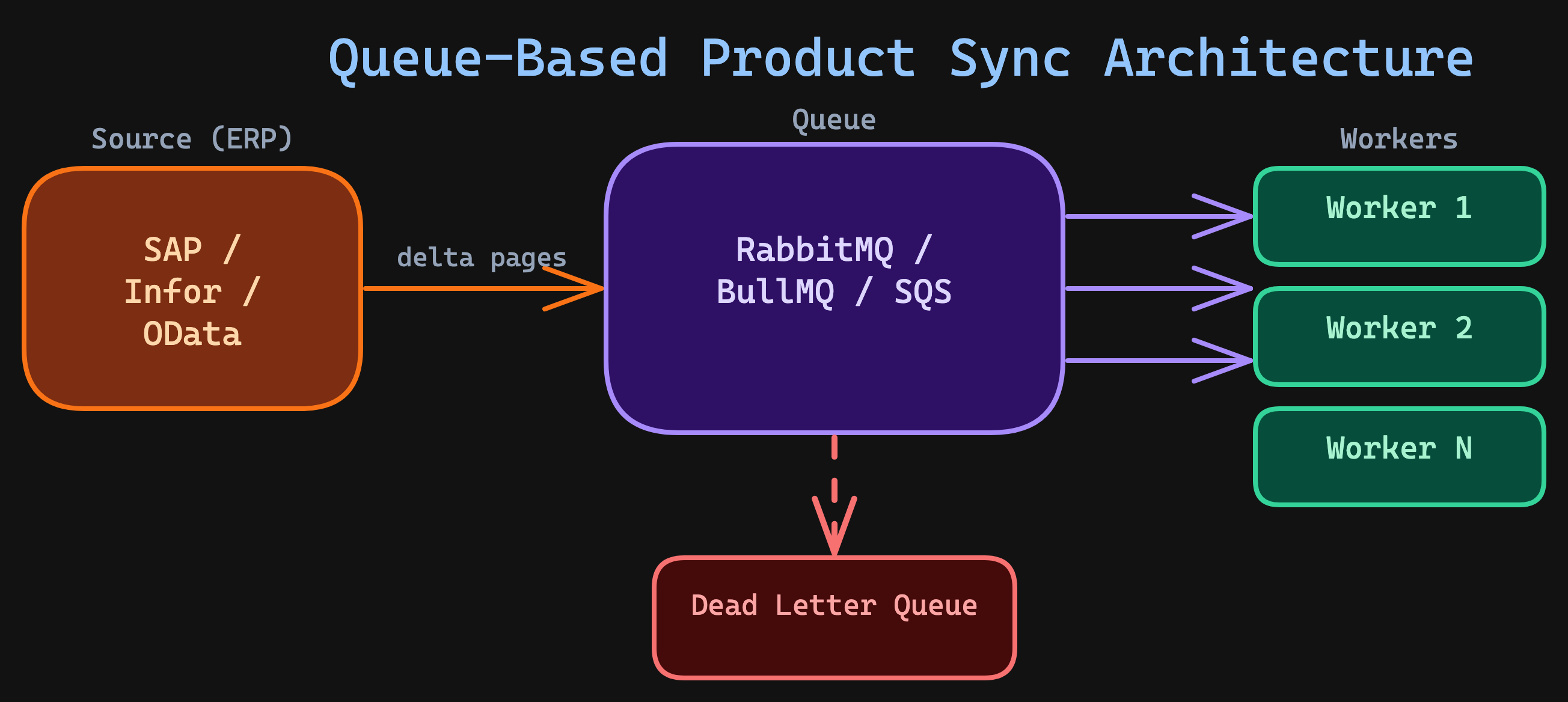
The queue-based approach gives you:
- Durability — if a worker crashes, the message returns to the queue. No lost chunks.
- Horizontal scaling — add more workers without changing the producer.
- Backpressure for free — workers only pull messages when they're ready.
- Dead letter queues — failed chunks are isolated for investigation, not retried infinitely.
This is the same pattern behind the hybrid approach in Polling vs Webhooks — decouple the trigger from the processing.
Real-World Product Sync Results
Here are the numbers from a production integration I built between Pimcore PIM and Adobe Commerce Cloud for a multi-brand retailer with 1.8M SKUs across 18 active websites and 33 stores:
| Metric | Before (naive) | After (five-layer architecture) |
|---|---|---|
| Catalog size | 1.8M SKUs | 1.8M SKUs |
| Effective catalog rows | ~32.4M website-level + ~59.4M store-level | Same — but synced intelligently |
| Full sync time | 12+ hours | 22 minutes |
| Delta product sync time | 1+ hours | 12-30 seconds |
| Average delta size | N/A (full every time) | 2,000-8,000 products |
| Sync failures | ~3% (silent) | < 0.01% (reconciled) |
| Memory usage | 8 GB peak | 400 MB peak |
| Recovery from crash | Start over from zero | Resume from last cursor |
The key insight: delta detection did 90% of the work. Going from 1.8M to ~5,000 actual changes per product sync cycle is the real win. But in the Adobe Commerce world, 1.8M SKUs doesn’t mean 1.8M rows. Prices and website-scoped attributes multiply by 18 websites (32.4M rows). Store-level fields — names, descriptions, URL keys — multiply by 33 stores (59.4M rows). The naive approach tried to push all scope variations in a single pass. The five-layer architecture batches per scope level: global attributes first, then website-level pricing, then store-level content — each with its own delta detection and parallel workers. That’s what made the 22-minute full sync possible.
Performance optimization details
Three additional optimizations contributed to the results above:
HTTP connection pooling. Reusing TCP connections across batch requests eliminated ~20ms of TLS handshake overhead per request. With 250 batch requests per cycle, that's 5 seconds saved.
Payload compression. Enabling gzip on request bodies reduced transfer size by ~70% for product data (which compresses well due to repeated field names in JSON). This mattered most for products with long HTML descriptions.
Cursor checkpointing. After each chunk completes, the cursor is persisted to the database. If the process crashes, the next run resumes from the last checkpoint — not from the beginning. Over six months, the sync crashed twice (OOM on the target side). Both times, it recovered automatically on the next scheduled run with zero manual intervention.
Five Mistakes That Kill Product Sync at Scale
1. Full sync as the only mode
Teams often build a full product sync and never implement delta detection. This works at 1,000 products. At 100,000, it's slow. At 1M, it's impossible without dedicated infrastructure.
Fix: Implement delta detection from day one. Even a simple WHERE modified_at > :lastSync cuts your sync volume by 99%.
2. Individual upserts instead of batch APIs
Sending one product per API call is the most common performance killer. Most eCommerce platforms support bulk endpoints — Shopware's _action/sync, Magento's bulk REST, Shopify's GraphQL bulk mutations.
Fix: Always use batch endpoints. A single request with 200 products is 10-50x faster than 200 individual requests, because you eliminate per-request overhead (TLS, routing, auth validation, response serialization).
3. Unlimited concurrency
"Let's just run 100 workers!" — this crashes the target system, triggers rate limiting, and actually reduces throughput due to retry overhead and connection contention.
Fix: Start at 5 workers. Measure. Increase in steps of 5. Stop when throughput plateaus or error rates tick up.
4. No crash recovery
If a 30-minute product sync crashes at minute 25, you've lost all progress. Without checkpointing, every failure means starting from zero.
Fix: Persist the cursor after each chunk. On restart, resume from the last checkpoint. This single pattern turned our sync from "fragile nightly job" to "self-healing continuous pipeline."
5. Zero observability
A product sync that "seems to work" is the most dangerous kind. Without metrics, you won't know that 0.5% of products silently fail every cycle — until a customer reports a wrong price or phantom inventory.
Fix: Log every sync cycle with: duration, delta size, success/failure counts, error details, and reconciliation results. Alert on anomalies: sudden spikes in delta size, elevated failure rates, or increasing sync duration are early warning signals.
The Integration Maestro Perspective
High-volume product sync isn't about raw speed — it's about architecture. The five layers I've described aren't complex individually. The power comes from how they compose:
Delta detection eliminates unnecessary work. Streamed chunking keeps memory constant. Parallel batch upserts multiply throughput. Backpressure prevents self-destruction. Reconciliation guarantees completeness.
This connects to several Integration Maestro rules:
- The Latency Compounding Law — serial API calls compound into impossibly slow pipelines; batch upserts and parallelism break the compounding
- The ERP Bottleneck Principle — the source ERP is always the tightest constraint; design your product sync around it, not through it
- The Data Gravity Rule — move deltas, not entire databases; delta detection embodies this principle
- The Failure Surface Rule — every API call can fail; chunking and reconciliation ensure individual failures don't corrupt the whole sync
And it builds on the patterns from the previous article — Polling vs Webhooks explained when to trigger a sync. This article explains how to execute it at scale.
The teams that sync millions of products reliably aren't using exotic technology. They're using these five layers — consistently, every time.
Want more integration architecture insights? Subscribe to the newsletter or connect with me on LinkedIn.
Enjoying this article?
Get more deep dives on integration architecture delivered to your inbox.

Integration Architect
Artemii Karkusha is an integration architect focused on ERP, eCommerce, and high-load system integrations. He writes about integration failures, architectural trade-offs, and performance patterns.
Came from LinkedIn or X? Follow me there for more quick insights on integration architecture, or subscribe to the newsletter for the full deep dives.